How is the Help Form on my Voting Site Managed?
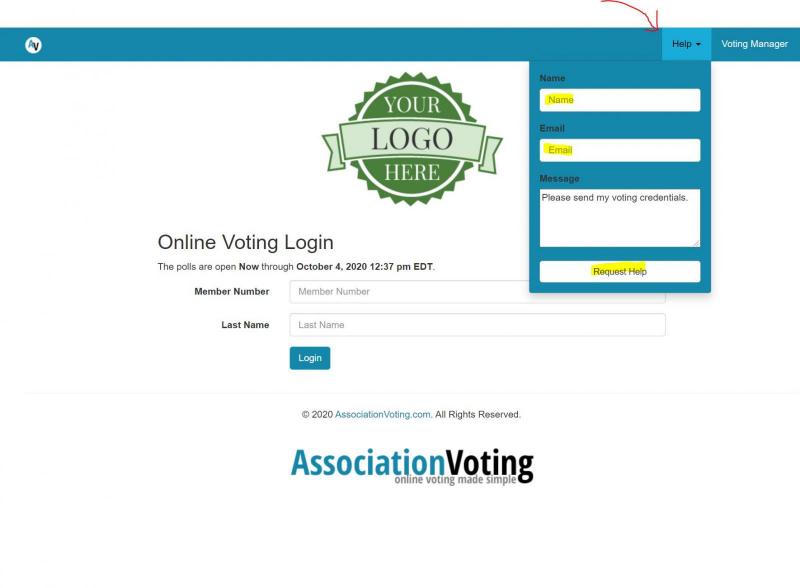
Voter fills in the Automated Help Form on the Voting Site:
You, the Voting Administrator, will get all help submissions, but this is how you can tell that the email was matched for the credential retrieval system:
- The Voting Manager will recieve this email:
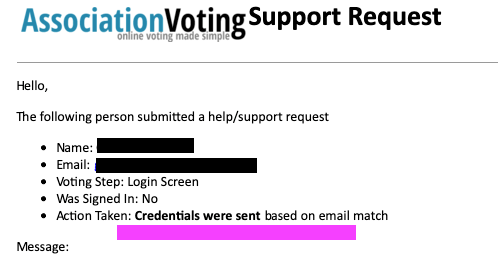
“Action Taken” indicates that the automated help system matched the email address with a voter and sent the credentials back to them. THUS NOTHING FURTHER IS NEEDED FROM YOU.
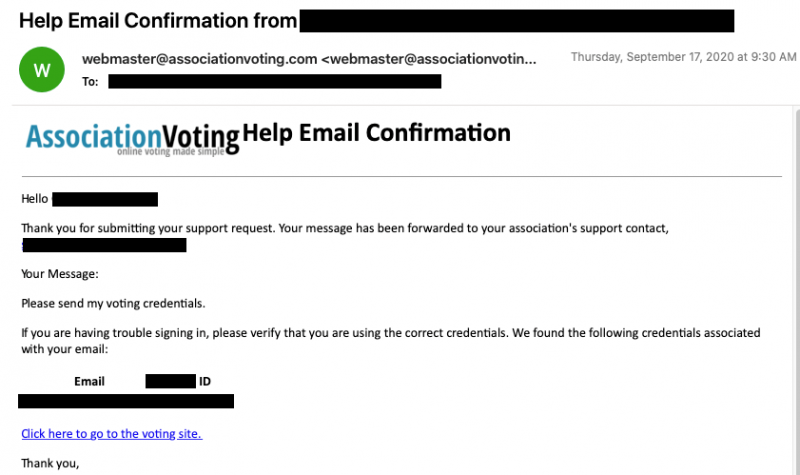
Now, the important part – you will also receive a copy of the credential match email. Here’s what that looks like:
- The Voter will recieve this email if the crendentials were found and sent. You the Voting Manager will be CC'ed:
So what happens in the other 10% of the time with help requests. There are 2 broad issues that would preclude the HELP system from automatically sending the credentials:
- Voter is using the wrong email address: Check in the Voting Manager Voter section and advise the voter to login with the email address in the system. You will need to send a direct email to the voter with this information as the system will not.
- Voter isn't in the system as a valid voter. Only you as the Voting Manager can determine if the Invalid Voter should be added to the system as a valid voter. If the answer is yes, goto Voters > Add in the Voting Manager and add the voter. To have the system send the credentials to the valid voter. simply fill in the help form on the Voting Site for the voter. The Automated system will send voter credentials to the new Valid Voter.
The final type of HELP request you will recieve as a Voting Manager is when a voter enters the credentials incorrectly. The automated Help sends the credentials and the link, but the user isn't entering the information correctly during login. To verify this type of error, goto Custom Reports > Report List and select Recent Login Failures report. From this screen you can see the errors when a user attempts to login. EXAMPLE: Based on this report you will be able to tell the voter, your account number is 123455 and you are entering 12345. You are missing the last "5". You will need to send this information to the voter as the system will not automatically send this.